RiskMandate v1.28.0
ARTICLE · 19 SEPTEMBER 2026

An approval prompt is not a human in the loop.

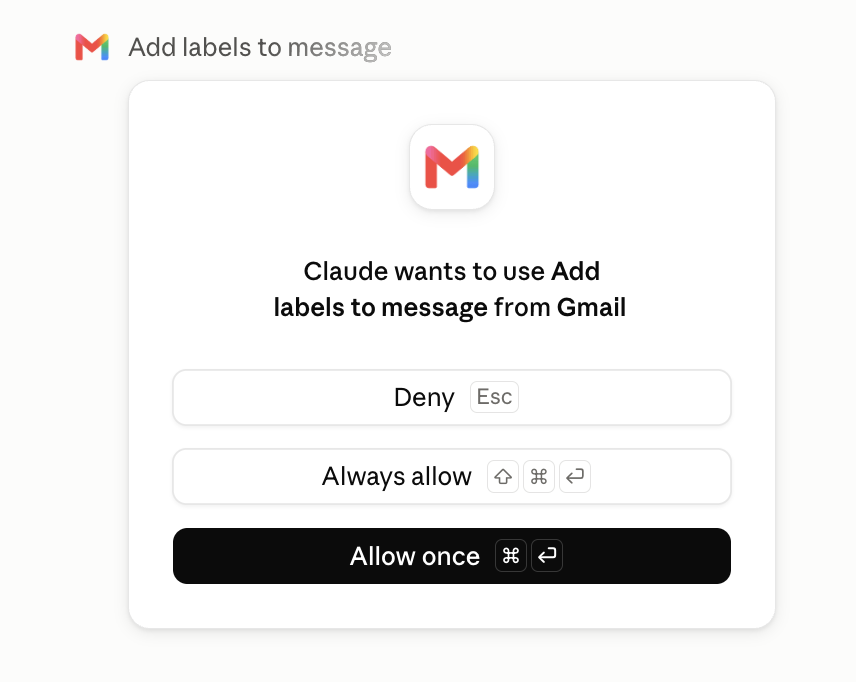
A connector asks Claude wants to use Add labels to message from Gmail and offers three buttons. It does not say which label, on which message, in which thread, or why the agent asked. The person clicking it is being made accountable for an action they have not been given enough to judge — and one of the three buttons removes the question permanently.

Shape: Claude with the Gmail connector enabled, the deployment described in that shape's behaviour policy.

Evidence: three prompts of this shape captured by the deployer on an account they run, 16 and 19 September 2026. Nothing was tested on anybody else's system.

This page as markdown: article-approval-prompts.md

01 · The screen

Everything it says, and everything it offers.

This is the whole prompt. It was captured on an account the deployer runs, in Claude in the browser. Two others of the same shape are in the record for this deployment: Claude wants to use Send email message from Gmail and Claude wants to use Moves a message to Trash from Gmail. The layout, the wording and the three buttons are identical in all three.

The approval prompt: a Gmail icon, the words Claude wants to use Add labels to message from Gmail, and three buttons — Deny, Always allow, and Allow once.
Captured 19 September 2026 by the deployer, on an account they run. Nothing on the screen is redacted, because the screen carries nothing to redact.
What is on it

A title: Add labels to message. A sentence: Claude wants to use Add labels to message from Gmail. A Gmail icon. Three buttons, with keyboard shortcuts.

Deny Esc Always allow ⇧⌘↵ Allow once ⌘↵ · the default

Allow once is the primary button — the filled one, and the one the plain Return-with-Command shortcut lands on. Deny is the escape key.

The prompt names a verb. A decision needs the object.

Everything below follows from that one gap, and none of it requires an opinion about anybody's product.

02 · What it cannot tell you

Seven questions the screen does not answer.

Not does not answer well — does not contain the information at all. Each of these is checkable against the image above.

  • Which label?

    A label is a folder, a tag, and on many accounts a filing rule that other people's automations read. Important, Invoices and Archive are not the same act.

  • On which message?

    One message, a thread, or a search result that matched two thousand. The screen names no message and no count.

  • Asked for by whom?

    By the instruction the account holder typed, or by a sentence inside an email the agent has just read. The prompt is identical either way, and reading the inbox is a row in this deployment's grant.

  • How many times?

    One call, or the first of a hundred in the same run. The prompt does not say whether it is per call.

  • What does the tool do, exactly?

    Add labels to message is a display name. The connector's own listing names label_message, label_thread, and two more truncated as apply_sensitive_messa… and apply_sensitive_thread… — read 16 September 2026, with more behind a Show all the capture did not expand.

  • Can it be undone?

    For a label, usually. For the same prompt over Send email message, no — and the screen looks the same. The record for this shape marks that row irreversible.

  • What does allowing it permanently cover?

    This tool, every Gmail tool, or every connector? The screens captured do not say, and the vendor's help page speaks of these actions without listing them.

Why this matters more than it reads. A person asked to approve an action is being asked to take responsibility for it. Responsibility without the object of the verb is not a decision; it is a signature. The same screen would be an adequate decision surface if it said add the label “Invoices” to 3 messages from Acme Ltd — the information exists on the calling side, and it is not on the screen.
03 · The button that ends the question

One click, by the account the prompt is about.

The vendor's help article describes the mechanism plainly, and describes its own off switch in the next sentence.

“By default, Claude asks for your approval before each of these actions. On Team and Enterprise plans, owners decide whether members can allow these actions to run without asking each time.”

Anthropic, Use Google Workspace connectors, read 16 September 2026
  • The prompt is per action. An agent asked to triage a morning's mail takes many actions. Every one of them is a modal in front of the person who asked for the triage.
  • The off switch is one click, and it is permanent. Always allow is on the same screen as the action it would stop asking about, sits one key away from the default, and is pressed by the account the prompt exists to protect.
  • Nothing records that it was pressed. Not on any screen captured here. The prompt's absence afterwards is the only sign, and an absence is not a record.
  • We do not know how often it is pressed. Neither vendor publishes a figure, and this site has not run a study. It is an open question below, not a statistic — a number nobody has measured does not become true by being obvious.

A bound the agent's own account can remove is not a control. It is a setting.

That is the test this site applies to every row in every behaviour policy: a control bounds a grant only if it is enforced by something the grant does not include. The grant here includes the ability to press Always allow.

04 · Underneath it, the answer is already yes

Google was asked once, on a screen nobody remembers.

The prompt sits above Google's authorisation, not inside it. When this deployment was connected, Google's consent screen asked for three things, each with its own tick box, all of them pre-ticked under Select all:

The line on Google's screenThe scopeWhat it covers
View your email messages and settings.gmail.readonlyevery message and thread in the mailbox, and the label structure
Manage drafts and send emails.gmail.composedrafts, and sending
Read, compose and send emails from your Gmail account.gmail.modifyreading, sending, and changing what is on a message — labelling included
  • Labelling is inside gmail.modify. Once that consent is given, a call to label a message is an authorised call. Nothing in Gmail refuses it, because there is nothing left to refuse: the account holder said yes to the class of action, not to the instance.
  • So the prompt is not a Gmail control. It is a client behaviour, above Google's authorisation, held by the party that built the client. Google's stack sees a token it issued being used within the scope it was issued for.
  • That is not a complaint about the scope model — it is the point. Google's ceiling does hold where it applies: asked to empty the Bin, the agent reported it had no tool, and Google's own scope text says gmail.modify “does not allow immediate, permanent deletion of threads and messages, bypassing Trash”. That is a real boundary, enforced by somebody the grant does not include. The approval prompt is a different kind of object, and putting both under the word control is how a reader ends up reassured.

Consent screen transcribed in the deployment's evidence record, 16 September 2026. Scope text: Google, Gmail API scopes, read 16 September 2026.

05 · What the record already says

The same prompt, written down in the deployment's behaviour policy.

None of this is a new finding. It is the send.message.world row of this shape's grant, with the seven answers that sit behind every barrier we record: who holds it, what it is made of, whether it moves without you, whether you would be told, whether you could check, what removes it, and what the credential would still allow if it went.

QuestionThe answer, for this barrier
What kind of barrierA setting — the third of four. Not nothing, not a rule in prose, not a boundary.
Who holds itYou — the account holder. One click on Always allow and the prompt is gone for good. On Team and Enterprise plans an owner above them decides whether members may make that click.
What it is made ofA per-action prompt in the client, with Deny, Allow once and Always allow.
Can it move without youYes — the switch is inside the deployment. Whoever is at the keyboard in the session can flip it.
Would you be toldNo — nothing announces that Always allow was clicked. The prompt simply stops appearing.
Could you checkPartly — the setting is visible in the account's own connector settings; no log outside the deployment says when it changed or who changed it.
If it went, what is behind itThe send itself. gmail.compose and gmail.modify were both consented, so with the prompt gone the credential sends, replies and forwards to anyone, with no further screen.
Nothing here is scored. This site does not rate a control as strong or weak, for the same reason it puts no score on a behaviour policy: what a barrier is worth depends entirely on the deployment it sits in. Seven facts, each with a source, and the reader does the judging. The one judgment we do make is the delta — the distance between what the agent was expected to do and what it can actually do.
06 · Where the accountability lands

The click is the record, and the message is yours.

This is the part that outlives the screen. When the agent in this deployment sent a message, the deployer opened the original on the sending side and read the headers.

No X-Mailer. No User-Agent. No header naming the client. One Received line saying the Gmail API sent it, from a numeric project identifier — and a body signed with the account holder's own name.

Measured 16 September 2026 on the deployer's account; the redacted .eml is in the deployment's evidence record
  • To the recipient, it is the account holder's mail. There is no published way for them to tell that an agent composed it.
  • To an investigator afterwards, the approval is the account holder's decision. A prompt was shown, a person pressed a button, the action followed. That is what the record will look like, and it will be accurate.
  • The decision it records was taken without the object of the verb. Which message, which label, which recipient, prompted by whose words — none of it was on the screen at the moment of the click.

An approval prompt transfers accountability without transferring the means to exercise it.

That is the whole of the argument. It is not that people click too fast, and it is not that the mechanism is worthless — a prompt with the arguments in it would be a genuine decision surface. It is that responsibility has been placed on the one party in the chain who was given the least to decide with.

A mandate is the other thing entirely.

This site's own definition, from the grant is not the mandate: a mandate has an issuer, a subject, a scope, an interval and a revocation path — a durable statement somebody who wasn't there can verify afterwards. An approval prompt has none of the five. It is consent to one instance, given by whoever happens to be in the session, recorded nowhere, expiring never once Always allow is pressed. Approving actions one at a time is not a substitute for saying, in advance and in writing, what this agent is here to do.

07 · What we do not know

Five open questions, and how each would be settled.

Written down rather than guessed. Every one of them is answerable from a vendor's own pages or from a system we are entitled to run; none of them is answerable by probing somebody else's.

QuestionHow it gets settled
Does Always allow cover the tool, the connector, or every connector?The vendor's own documentation of the setting, quoted; or the connector settings screen after pressing it, on an account we run.
Does any surface show the arguments — the label, the message, the recipient?The same prompt on desktop and mobile, captured on an account we run. Three captures in the browser show none.
Is there any record that Always allow was pressed, and can an owner see it?The admin documentation for Team and Enterprise plans, quoted.
Does the display name always match the tool invoked?The connector's tools/list response against the prompt's wording, on an account we run.
How many people who click this know what gmail.modify permits?Nobody has published a figure. It would take a study, run properly, and until somebody runs one the honest answer is that we do not know — which is itself worth stating, because the mechanism is being relied upon as though we did.
08 · What would change it

Three things that would make the prompt a decision, and one that does not need it to be.

Stated in the vocabulary this site uses, because “add more oversight” is not an instruction anybody can act on.

Still a setting

Put the arguments on the screen

The label, the message, the recipient, and whether the instruction came from the person or from text the agent read. This would not change the barrier's kind — the off switch is still one click — but it would turn a signature into a decision.

A boundary

Move the switch above the account

The vendor's own page says owners on Team and Enterprise plans decide whether members may allow actions without asking. A switch the agent's account cannot flip passes the enforcer test. That is the difference between a setting and a control, and it already exists in the product for those plans.

A boundary

Narrow the credential, not the prompt

Three scopes were consented in one click. A deployment that reads a mailbox does not need gmail.compose. Unticking a line on the consent screen makes sending a boundary — enforced by Google, held against a consent, and not removable from inside the session.

And the one that does not need the prompt to change: write the delta down before the first click.

What this agent can do, what it was authorised to do, the gap between the two, and what actually stands in the way of each row. That document exists for this deployment, and it is the thing an approval prompt cannot be: durable, specific, and readable by somebody who was not in the session.

See the behaviour policy for this shape →

Sources. Anthropic, Use Google Workspace connectors (read 16 September 2026). Google, Gmail API scopes (read 16 September 2026). The connector's listing in Claude's directory (sign-in required; captured by the deployer 16 September 2026). The approval prompts, the consent screens and the sent message's headers: captured by the deployer on an account they run, 16 and 19 September 2026, and transcribed in the evidence record inside the vault for this shape.
What was not done. Nothing was tested on anybody else's system, no account but the deployer's own was touched, and no claim here is a verdict on a named company. The screens are quoted; where a vendor's pages disagree with each other, the behaviour policy for this shape publishes the contradiction unresolved rather than settling it.
Where this connects

Where the prompt fits in the rest of it.

One screen, followed all the way down. These are the pieces on either side of it.

The next one

Every agent you run has a gap like this one.

Sixteen deployment shapes are written up as Agent Behaviour Policies: what the agent can do, what it was authorised to do, the distance between them, and who holds each thing standing in the way. Read them, or have one corrected for your deployment.